Free Spreadsheet
Free commission tracking spreadsheet for brokerages
One Excel file that tracks every deal, calculates each agent's split, cap or flat fee, checks the required documents, and gives you the figures for the CDA. Built for the brokerage side, not the agent's. No sign-up, no email required.
Six tabs, 80 KB. Opens in Excel, Numbers and Google Sheets.
CDAFlow calculates each split from the agent's plan and builds the CDA from the deal. Start a 30-day free trial (up to 10 agents, no credit card) or book a call.
What's in the spreadsheet
- Read me
- How to use it, the legend, the assumptions, and the disclaimer.
- Agents
- One row per agent with their plan: split, cap, or flat fee, plus the transaction fee. Cap paid this year and cap remaining calculate from the deals.
- Deals
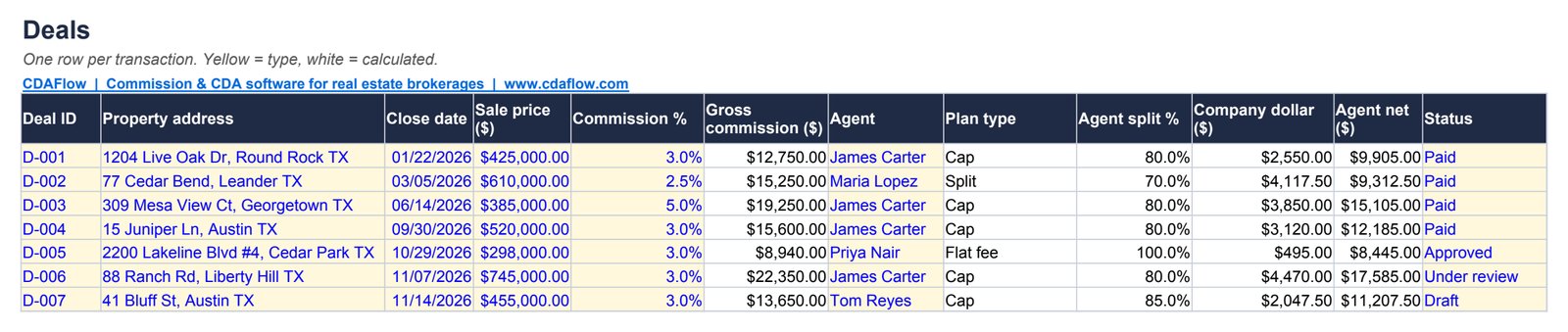
- One row per transaction. Type the address, MLS number, close date, side, sale price, commission rate, referral fee, agent and status. Gross commission, the split, company dollar and agent net calculate for you. Once an agent reaches their cap, later deals keep only the transaction fee.
- Documents
- A Y / N / N/A grid per deal for the required documents, with a Complete or Missing flag. Change the columns to your state's list.
- CDA
- Type a Deal ID and every figure the CDA needs fills in: property, closing date, sale price, total commission, referral, agent payout, brokerage share, and a check that the payouts add up.
- Dashboard
- Deals this year, gross and company dollar on paid deals, pending agent payouts, deals waiting on review, approved deals with no CDA sent, deals with documents missing, and each agent's cap remaining.
How to use it
- Save a copy, rename it, and delete the four sample agents and seven sample deals. They are there to show how the formulas behave.
- On the Agents tab, add each agent once with their plan type, split, cap or flat fee, and transaction fee.
- On the Deals tab, add a row for each transaction and fill in the yellow cells. The white cells calculate.
- On the Documents tab, mark each required document as it arrives. The deal shows Missing until every column is Y or N/A.
- When the broker approves a deal, open the CDA tab, type the Deal ID, and copy the figures onto the CDA template. The broker signs it and it goes to title.
Use it with the free CDA template
The spreadsheet does the tracking and the math. The CDA is the document the broker signs and sends to the title company. The CDA tab lists the figures in the same order as the sections on our free fillable CDA template, so you can copy them straight across. Together they are the manual version of what CDAFlow does.
Make it your own
- Save a copy first. In Google Sheets, File > Make a copy. Rename it and add your brokerage name.
- Change the Documents tab columns to the forms your state and your brokerage actually require. The ones in the file are examples.
- Add plan types or fees if your commission agreements need them. The Deals tab reads plans from the Agents tab, so change them there.
- Free to use and change for your own brokerage. Please don't resell it.
Where a spreadsheet stops working
This file will run a brokerage of five to twenty agents. Both of CDAFlow's first customers ran on one before they switched. Here is what a spreadsheet can't do:
- Every CDA is still retyped by hand from the contract and the spreadsheet.
- Nothing records who approved a deal or when the broker signed the CDA.
- Agents can't see where their deal is without asking the office.
- Missing documents are chased by email, one agent at a time.
- Two people in the same file overwrite each other's changes.
Common questions
- Does it handle commission caps?
- Yes. Give an agent a Cap plan with their split and annual cap on the Agents tab. Each deal takes the brokerage's share until the cap is paid for the year, then later deals keep only the transaction fee. Caps reset on 1 January; the Read me tab explains how to change that for anniversary caps.
- Does it handle flat-fee plans?
- Yes. A Flat fee plan keeps a fixed amount per deal for the brokerage and pays the agent the rest, after any referral fee.
- Can I use it in Google Sheets or Numbers?
- Yes. In Google Sheets, use File > Import and choose the file. The formulas use standard functions (INDEX, MATCH, SUMIFS, COUNTIFS) that Google Sheets, Numbers and Excel all support. The dropdowns and colors carry over.
- Is it really free?
- Yes. No sign-up, no email address, no watermark. Use it and change it for your own brokerage. Please don't resell it.
- Does it replace accounting software?
- No. It tracks deals, splits and CDAs. It does not post to a general ledger, run payroll or file taxes. Use it alongside your accounting software, or alongside CDAFlow once the spreadsheet stops keeping up.
This spreadsheet is a general tool, not legal, tax, accounting or brokerage advice. CDAFlow is a software company, not a brokerage or law firm. Commission rules, required documents and disbursement practices differ by state, MLS and brokerage, so check every figure against your own commission agreements and your state's rules before paying anyone. The brokerage and its broker remain responsible for every CDA and payment. Provided as is, with no warranty.
New to CDAs? Read what a CDA is and how the process works.
Skip the spreadsheet
CDAFlow is commission and CDA software for real estate brokerages. AI reads the signed contract and creates the deal, the split is calculated from the agent's plan, a state checklist shows what's missing, and the broker approves in one queue. After approval, the broker or an authorized admin applies the broker's saved e-signature in one click and the CDA is emailed to title.
See how CDAFlow's commission tracking software handles plans, payouts and the CDA.
Compare CDAFlow's plans and prices.