Features
Commission tracking software for real estate brokerages
CDAFlow works out each agent's commission from their own plan as soon as a deal is created. Once the deal is approved, it builds the CDA, the broker signs it in one click, and it's emailed to the title company. It's for brokerage owners, managing brokers and admins in any US state.
A plan for every agent
Admins set up your split, cap and flat-fee plans and your fees. Each agent gets a plan when you invite them, so it applies from their first deal. An agent without a plan of their own uses your default plan.
Split and payout worked out when the deal is created
The gross commission goes in as a percentage of the sale price or a fixed amount. CDAFlow applies the agent's plan and shows the brokerage split, each deduction and the agent's net payout at the top of the deal.
On the sample deal in our demo, 3% of a $615,000 sale is $18,450. Take off the brokerage split and an E&O fee and the agent's net payout is $16,105, on screen from the moment the deal exists.
The CDA, built from the deal
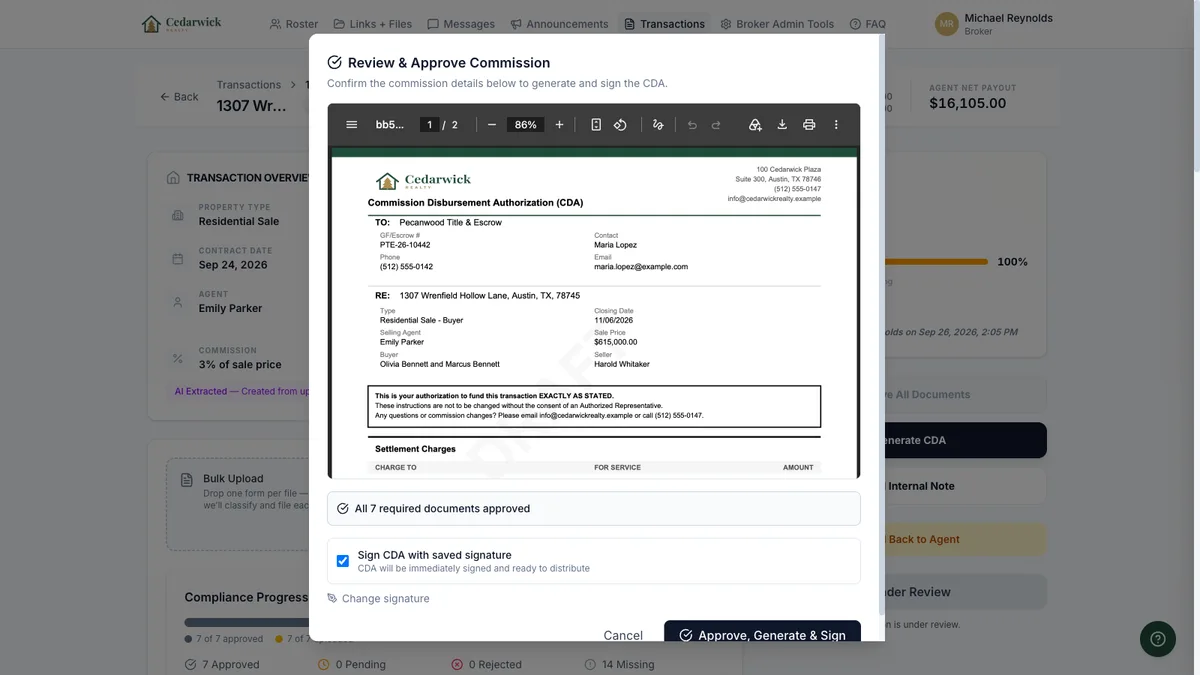
When the deal is approved, CDAFlow builds the CDA from it: the title company, the property, the parties, and every charge and payout, itemized. The broker sees the CDA on the approval screen.
Then the broker or an authorized admin applies the broker's saved e-signature in one click. The signing is recorded in the activity log, and the CDA is emailed to title.
Statements agents can read
Agents see the gross commission, deductions and their net payout on each of their deals, and get commission statements. Every deal shows where it stands, from draft to approved to paid, and agents are notified at each milestone.
Moving off a spreadsheet
Both of CDAFlow's first customers ran their commissions on a spreadsheet before they switched. If that's you today, our free commission tracking spreadsheet works out splits and caps and gives you the figures for each CDA. Pair it with the free CDA template, or read what a CDA is and how the process works.
Frequently asked questions
Can each agent have a different plan?
Yes. Admins set up split, cap and flat-fee plans, and each agent is given one when they're invited. An agent without a plan of their own uses your brokerage's default plan.
When is the agent's payout worked out?
As soon as the deal is created. The brokerage split, each deduction and the agent's net payout show at the top of the deal from then on, and the CDA is built from the same deal.
Who can sign the CDA?
The broker, or an admin the broker has authorized. Either way it's the broker's saved e-signature that's applied, in one click, and the signing is recorded in the activity log.
How does the CDA reach the title company?
CDAFlow emails it to title once it's signed. The title company's details are entered with the deal, so nobody has to forward the CDA by hand.
Can a CDA go out before every document is approved?
Yes, if the broker agrees. The agent can ask the broker to generate the CDA early, and the deal shows “CDA Generated, Docs Pending” until every required document is approved. Closing still needs the full set of documents.
Can agents see their own commission?
Yes. Each agent sees the gross commission, deductions and their net payout on their own deals, follows each deal from draft to approved to paid, and gets commission statements.