Free Template
Free CDA template
A blank, fillable Commission Disbursement Authorization (CDA) you can type into in any PDF reader, print, and send to the closing company. No sign-up, no email required.
One page, US Letter, 40 KB. Fillable fields only.
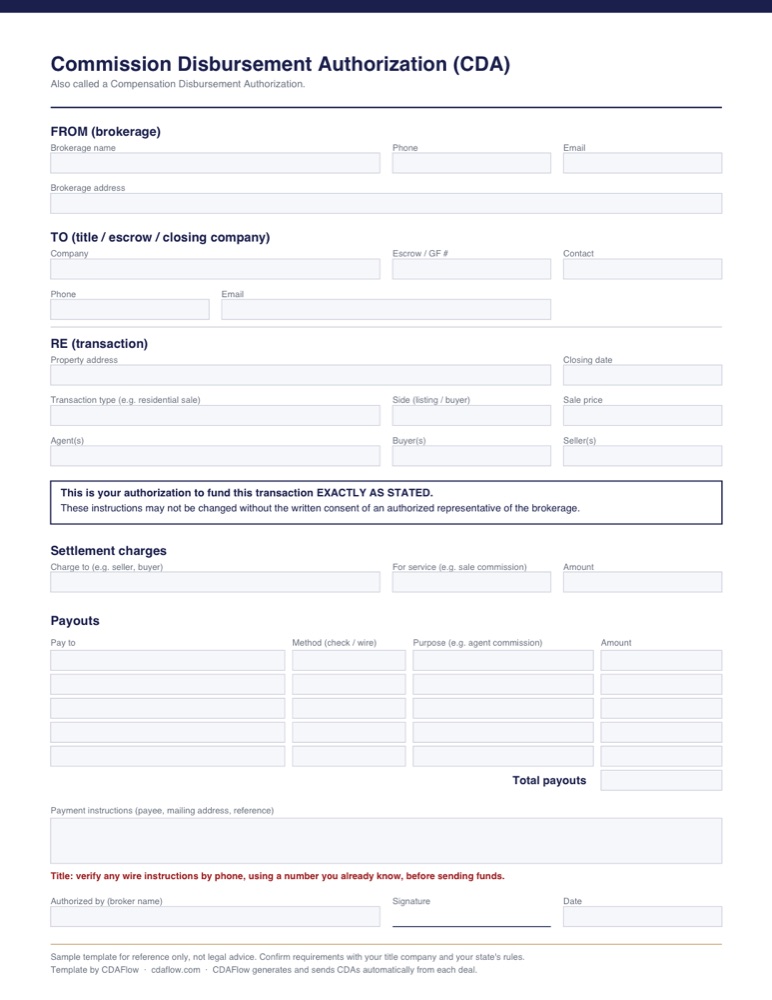
What's in the template
- From (brokerage)
- Brokerage name, address, phone, and email.
- To (closing company)
- Title, escrow, or closing company, escrow/GF number, and contact.
- Re (transaction)
- Property address, closing date, transaction type, side, sale price, agents, buyers, and sellers.
- Authorization
- The instruction to fund exactly as stated, and that changes need the brokerage's written consent.
- Settlement charges
- Who is charged the commission, and the amount.
- Payouts
- Up to five payees, each with method (check or wire), purpose, and amount, plus the total.
- Payment instructions
- Payee details, mailing address, and reference.
- Broker approval
- Authorized name, signature, and date.
How to fill it out
- Open the PDF in any reader (Adobe Acrobat Reader, Preview on Mac, or your browser) and type into the fields.
- Enter your brokerage details and the closing company's contact and escrow number.
- Copy the property, parties, closing date, and sale price exactly as they appear in the contract.
- List the commission charged, then each payout. Check the payouts add up to the total.
- Add payment instructions for each payee.
- Have the broker review and sign, then send it to the closing company.
Keep it safe
- A completed CDA contains payment details. Send it through a secure channel, not as a plain email attachment with full bank details.
- Closing companies should always verify wire instructions by phone, using a number they already know, before sending funds. Wire fraud often starts with a changed CDA or email.
- If anything changes after it's sent, issue a new, signed CDA rather than editing the old one.
This is a sample template for reference only, not legal advice. Requirements vary by brokerage, title company, and state. Confirm with your closing company and your state's rules.
New to CDAs? Read what a CDA is and how the process works.
Skip the template
CDAFlow builds the CDA from the deal, calculates every split, and itemizes each payout. After approval, the broker or an authorized admin applies the broker's saved e-signature in one click, recorded in the activity log, and the CDA is emailed to title.