Features
Compliance software for real estate brokerages, from checklist to broker approval
CDAFlow gives every transaction a checklist of the documents it needs, files what agents upload against it, and puts it all in one queue for the broker to approve. Agents, admins and the broker see what's missing before approval, not after.
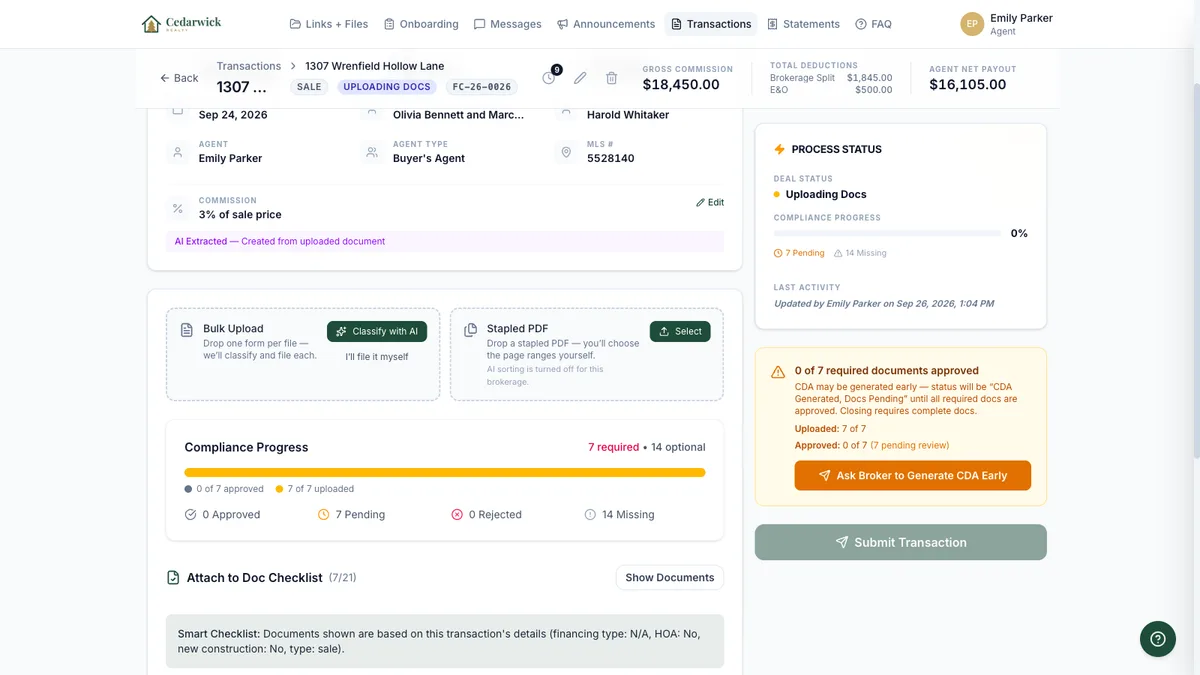
A checklist for every deal
Admins set the required documents for each deal type, using the forms your state and your brokerage require. The checklist then adjusts to the deal: financing, an HOA or new construction change which forms it asks for.
Required and optional documents are counted separately, so everyone on the deal sees what's uploaded, what's approved and what's still missing.
Agents drop files in, AI files them
Agents drop in every document for a deal and AI matches each one to the right form on the checklist. An agent with one stapled PDF can split it into pages and assign each part to its form. How the AI reads and files documents is on the AI transaction management page.
One review queue for the broker
Every deal waiting for review lands in one queue. The broker sees each document side by side with the list of what's pending, approves it with one click, and the next one opens. When the rest are fine, the broker can approve everything left at once.
Sent back with a reason
When a document isn't right, the broker rejects it and adds a reason. It goes back to the agent with that reason, so the agent knows what to fix, and the rejected count shows on the deal next to approved, pending and missing. The broker can also send the whole deal back to the agent.
Frequently asked questions
Which documents does the checklist ask for?
The ones your admins mark as required for each deal type, adjusted to the deal: financing, an HOA or new construction each bring their own forms. Optional documents are listed too, and counted separately from the required ones.
Does it work in my state?
Yes. Brokerages in any US state can use CDAFlow, and it's live today with brokerages in Texas and Colorado. The checklist is built from the forms your admins mark as required, so it follows your state's forms and your own rules.
Can a broker approve everything at once?
Yes. In the review queue the broker can approve one document at a time, with the next one opening after each approval, or approve everything left on the deal at once.
What if an agent uploads one stapled PDF?
They can split it into pages and assign each part to the right form on the checklist, so each form is checked off on its own.
What happens when a document is rejected?
The broker adds a reason, and the document goes back to the agent with it, so the agent knows what to fix. It shows as rejected on the deal. The broker can also send the whole deal back to the agent.